Showing posts with label Studio J. Show all posts

Monday, June 15, 2015

The Many Uses of Studio J - Use Your Reprints to Make Mini Albums!

My good friend, Heather, documented her recent trip to London and Paris using Studio J, Close to My Heart's digital scrapbooking program. As soon as she finished designing her layouts, she decided to purchase and print her 12" x 12" layouts through Close To My Heart, and she automatically received the JPG files for her layouts. She then thought that it would be fun to use these JPG's and print them out in smaller sizes. So she sent them to Persnickety Prints and had them printed in 8" x 8," to put in an album for her friend, and also in 4" x 4," for a  mini album. This past weekend, when we got together for our monthly scrapbooking/crafting time, she worked on this adorable album and kindly gave me permission to photograph and post her pictures!

Heather used CTMH's Artbooking Cricut cartridge to cut pages out of cardboard and pages out of the Wanderful paper packet (which she had used the digital form of in her Studio J layouts). She simply layered the Wanderful papers over the cardboard and then added her 4" x 4" prints of her layouts to each page -- except for the cover. The cover is a section of a patterned paper from Wanderful, plus a sticker from the Wanderful Complements, and a bit of journaling! Simple, elegant, and beautiful!

She put her album together with binder rings and ended up with this cute and sturdy mini album!


 I added my scissors to this picture to give you an idea of the scale. The scissors is about 6" long.

Imagine a few of these types of albums on your bookshelf or in a little basket on your coffee table! It'd be such a fun way to display your travel layouts or event layouts...or any photos you like!

If you haven't ever tried Studio J, I urge you to play around with it. It is free to try out and it is fun! You do not have to purchase any software. You just need an internet connection and digital pictures. The program does all the enlarging and re-sizing of photos according to the layouts you choose. You can sart with a blank canvas or use some premade layouts and add or subtract according to your tastes. The really nice thing is that you can work on a layout, save it, and then go back to it when you have time, without having to clean up! 

If you decide you like your layouts and want to purchase them, they are 6.95 per two-page layout and they include the JPG files. You need to purchase a minimum of 4 double layouts in an order. If you just want to buy the JPG files, they are 2.95 per two-page layout.


Pin It

Wednesday, April 29, 2015

New York Visit Studio J Layouts

Have I told you how much I love Studio J, Close to My Heart's digital scrapbooking program? I know I have...but it bears repeating! You can probably tell that it's been a busy time for me from my lack of blog posts. Not much time to be creative (which I really miss--it makes me cranky when I can't be creative). But I really wanted to do some scrapbooking so I went to my stalwart friend, Studio J, to help me out.

Aside from being something that I can work on in little bits of time and save without worrying that my layouts will get ruined or moved around before I finish them, Studio J is incredibly flexible. I had a lot of photos that I wanted to scrapbook from a recent visit to NY. I started with preset layouts and then I added pictures to each of my layouts. So even though a layout may be listed as having enough photo wells for twelve pictures, you can add additional photo wells to suit your needs.

If you count how many photos I included in my last layout pictured here, you'll see that it comes to twenty-three! That would have taken me quite a while to scrapbook, let alone to print, enlarge, and shrink down all the pictures I needed! I finished these layout in less than two hours working in short little intervals of time over the course of two days -- I even worked on them a little in the morning between getting my son off to school and getting ready to drop off my daughter at her school. The majority of my time was spent on deciding which pictures I should include.

I used the Wanderful paper packet, which is still currently available to purchase. But I also love how some of my favorite papers which have been retired, are still available in digital format. Anyway, take a look and let me know what you think! You can click on the thumbnails to get a larger view.


Pin It

Wednesday, December 31, 2014

Four Studio J Digital Scrapbooking Layouts

Here are some Studio J digital layouts I completed tonight! You can click on the thumbnails to view them larger.

So glad to have this wonderful scrapbooking tool. The first double layout and the last one use the new paper packs, Hopscotch and Heartstrings. The nice thing about Studio J is that you can still use colors which aren't in the particular paper pack you are using. You can even tint a patterned paper from a kit you are using. 


The following layout is meant to have room for six photos but I switched the journaling box to a photo well and added two more photos. I'm glad to have this flexibility now! Do you like the stitching I added to the pink photo well on the right hand page?


 Studio J makes it easy to add many photos to one layout.

Pin It

Saturday, March 29, 2014

Last Days for $5 Double Layouts

Today, I was able to finish all of the layouts for my daughter's third grade pictures which will go into her school album. It took me just a couple of hours to complete five digital double layouts (ten pages total)! Most of that time was spent in locating my pictures on various computers and flash drives! The actual scrapbooking portion  took very little time and I was really pleased with the outcome. Yay! This also let me take advantage of Close To My Heart's Studio J sale, $5 double layouts in March. If you haven't already tried it, take a look here: http://lubna.ctmh.com/ctmh/products/studioj.aspx

Here are a couple of the layouts I did today.


I also used the "No Limits" layout option to see how processing photos through Studio J will come out. I just plugged in photos (both 4 x 6 and 3 x 4) on two double layouts. I will let you know how they turn out!

Pin It

Wednesday, March 5, 2014

Studio J, Digital Scrapbooking on Sale for March

Have you ever wanted to try digital scrapbooking? Now is the time with Close To My Heart's Studio J! In March, a double layout costs only $5! It's always free to try it out...you only pay if you want to print your layout.

Another great feature is the ability to print photos through Studio J. Whenever I want a 4" x 3" for my Project Life type of scrapbook, I usually go into Photoshop and put two photos onto a 4" x 6" canvas. Then I upload them to a photo service to get them printed. This is pretty time consuming but it's been my process. Now, I can get my smaller photos printed through Studio J just by dropping them into the appropriately sized photo wells (and I'll bet they will be better quality than my Walmart photos!). I am so excited to try this out!

If you want to take a look at Studio J and play around with all of it's features, go to my website- http://lubna.ctmh.com/ctmh/products/studioj.aspx, set up your free account and try it out!


Pin It

Friday, May 17, 2013

Studio J Custom Photo Wells

All I can say is YAY! Been waiting for this!


Pin It

Saturday, May 11, 2013

Love your Layout: May 2013

I'm so excited! Close To My Heart has added a new feature to Studio J (digital scrapbooking) to make it even more versatile. Now we can add photo wells and resize photo wells. There's even a blank layout so we can make our own digital designs. Whoo hoo! Did I say I was excited? Because I am! I still appreciate having so many predesigned layouts for the convenience and speed but I am so happy that now I can experiment with a blank canvas too! Remember, it's free to try Studio J and there's no software to purchase. You only pay for any layouts you want printed and/or for any jpegs. All you need to try Studio J is an internet connection. Click here to try it out!

Here's the latest Love Your Layout video:

Pin It

Friday, April 19, 2013

Love Your Layout: April 2013

Here's some creative inspiration for Studio J, CTMH's digital scrapbooking program.
Pin It

Thursday, February 28, 2013

Love Your Layout: February 2013

Take a look at how to use and modify the embellishments with the Later Sk8tr digital kit.

Pin It

Wednesday, February 27, 2013

Studio J®: Focus on the Photos

If you haven't had time to take advantage of the Studio J special for February (every double layout is only $5), don't worry! This special has been extended until March 15th! I'm hoping to finish up my layouts for my 2012 family album. So glad I have more time! Here's an informative video to give you some introductory tips in case you've never tried Studio J. Remember, there's no charge to try it out! Just set up an account here and play with it!


Pin It

Thursday, January 31, 2013

February 2013 Constant Campaign - Digital Delights

I'm so excited about the February Close To My Heart Special! All Studio J layouts (2 pages) will be $5! Yay! It's a savings of $1.95 per each two page layout. I have a ton of digital layouts that I'd like to do to finish up my 2012 family album and the kids' school albums so this is going to be great! There will also be new digital paper packs in February so I am looking forward to working on my layouts. If you haven't tried Studio J yet, now is the time. Remember, there's no software to buy and it's free to try out. You only pay for your printed layout.s Go here to get started.

Here's the latest Love Your Layout video for you to pick up some tips and tricks on Studio J.


Pin It

Monday, January 14, 2013

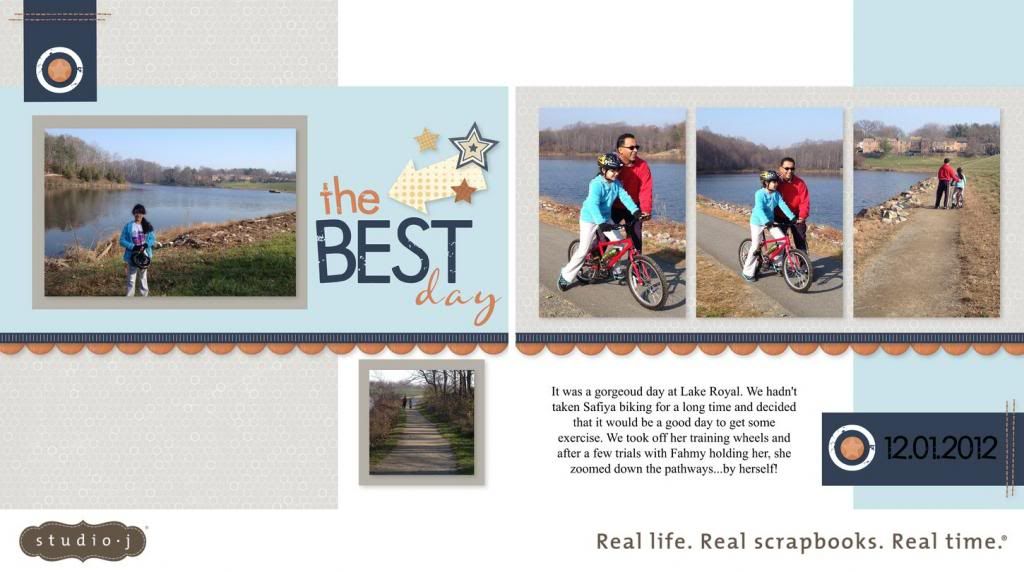
The Best Day - Studio J Layout

It's been a long time since I posted a Studio J layout so I thought I'd share. I used one of the new layouts in the Express Collection in Studio J. It was super quick and I love how it came out. Except it looks like I don't know how to spell gorgeous! That's what happens when I rush and don't use spell check!

Pin It

Monday, June 25, 2012

Love Your Layout : June 2012

Here's the latest Studio J layout video from Close To My Heart.
Pin It

Friday, February 3, 2012

February 2012 Constant Campaign — Five Double Layouts for Free

During the month of February, for each Studio J® 5-pack you purchase, you’ll get one 5 pack for free. A Studio J® 5-pack includes 5 two-page printed digital layouts, 5 Memory Protectors® (page protectors), and free shipping and handling. This is a value of $55. Please note that 5 pack codes do not have expiration dates but all 5 layouts have to be purchased on one order.
If you'd like to try out Studio J® digital scrapbooking, simply go to https://lubna.myctmh.com/Retail/StudioJLanding.aspx?PageId=185 and you can either create an account or try it out without creating an account. The benefit of creating an account is that you can save any layouts you create for 90 days. You do not need to purchase or download software to use Studio J®. If you decide to purchase a layout (getting the 12" x 12" layouts mailed to you), that is when there is a charge. Check out this link for pricing information: https://www.studioj.com/studioj_pricing.html
Pin It

Sunday, December 18, 2011

Backyard Fun - Studio J Layout

Whew...I feel like I am just coming up for air! The fall is always really busy so I tried to be prepared this year but, as my workload increased, certain things (like my creative pursuits) had to make way. I really miss it when I can't craft!

Studio J has been such a wonderful way for me to sneak in some crafting time even when things are hectic. I don't have to worry about clearing out a space and getting out all of my materials out which all takes time (and then cleaning up after which takes even more time). I love working with actual paper and ink and stamps.  But it is nice when I have limited time to just turn on the computer, sign in, and start experimenting with my layouts. If I need to go do something in the middle, my project gets saved automatically. If I come back and don't like it, I can rearrange it or just start all over without having to worry about "ruining" my paper!

This layout is a 14 picture layout called Snappy and it's available to Studio J members. You could easily turn it into a 16 picture layout by converting the title box and the journaling box into photo wells. I deleted my title box and just used the letters from the Quick Title Tool in its place. I left my journaling box as is and I also added a small journaling box to the bottom right of the left page so I could include the date separately.

Here is the Love Your Layout video for December from Close to My Heart. It gives some great tips about how to personalize your layout including a different way to make a border by cropping Stickease. Click on the arrows in the bottom right of the embedded screen to expand the video.

Pin It

Saturday, November 19, 2011

Love Your Layout: November 2011

 Here's a great video that shows some tips on layering embellishments, adding journaling, and adding a title in Studio J.

Pin It

Sunday, October 16, 2011

Lucky Little Pumpkin Studio J Layout

I've been neglecting my Studio J layouts! I usually place an order every month but didn't have time to last month with school (and work) starting up. I finally had some time to play and I was inspired by the Heart 2 Heart Challenge Blog. The challenge was to do a layout and journal/tell a story about your pictures. I had this idea in my head since Monday but only got a chance to work on it today! Anyway, it's about a cute little pumpkin that actually survived and grew in our tiny, somewhat dim backyard garden. Click on the picture and it should enlarge for you so you can read the journaling. Enjoy!
Pin It

Saturday, June 18, 2011

Scrapping Goals and Studio J Layout Share

I went over to scrapbook with my friend Heather on Wednesday and I finished up the last of my paper layouts for my 2009 family scrapbook. I'm so excited -- I am expecting my next Studio J layouts to arrive on the 22nd. Once they come, my 2009 family album will be complete! I will also get some of my daughter's school layouts (bringing me mostly up to date, except for the pictures I took today yesterday at the end of the year Mexican Fiesta and the ones I hope to take on the last day of school). So I think I can say that I've completed my goal to finish our 2009 album by the end of June. Yay! Moral of the story: it's good to set appointments to scrapbook and to scrapbook with a friend. Thanks Heather!

I also started on some 2008 layouts last Wednesday which makes me want to set a goal for completing my 2008 family scrapbook. I think many of my 2008 layouts might need to be "traditional" cut and adhere, paper layouts since I don't have all of the pictures stored digitally on our computer, so I wonder if it'll take me longer...and even though I'll be home more with no preschool teaching and less of a workload from my work at home job, I'll have the kids 24/7. I would love to finish this album by the end of summer. Maybe I can give myself until the end of September to finish our 2008 album...do you think I can do it?

Here's my scrapping "To Do" list:
  • Clean and organize my scrapping area (the basement) -- I have oozed over into the living room due to a lack of open and clear horizontal space on my art table downstairs and I need to put an end to that!
  • Work on as many paper 2008 layouts as possible -- my mini goal is to finish the January, February, and March 2008 layouts by mid or late July
  • Keep working on one large (over 10 double layouts) monthly order of Studio J layouts to take advantage of the free shipping
  • Work on 2011 layouts in Studio J
  • Work on any 2008 layouts for which I have the digital photos on the computer (mostly the latter part of the year)
  • Finish my daughter's school layouts for this year in Studio J (approximately 2-3 more layouts)
  • Start on my son's school layouts for this year in Studio J
Whew! That's ambitious for me! Anyway, on to the layout share. Here's one of the school layouts for my daughter's album. My daughter will be attending a different school in the fall and one of the things I thought she would miss the most was her art class. Her art teacher was just wonderful. As it turns out, she is leaving at the end of this year too in order to work on a Masters degree in Art Therapy! So I like her even more now since that was my field of study and I don't feel so bad about my daughter going to a different school!


Pin It

Sunday, May 15, 2011

Studio J Layouts -- Grace and You Rock

I usually haven't been setting goals for scrapbooking as some people do (you know, I'll have this many layouts completed by such and such a date). It has been sort of overwhelming for me to think in those terms in the past but I do feel like I can finally set some goals now that I have a "handle on things" with having completed so many digital layouts.

As you know, I'm working somewhat backwards. I've finished my family album for 2010 (all digital), I'm halfway finished with my family album for 2009 (combination of digital and traditional - after all I still have all of that beautiful scrapbooking paper!), I've gotten caught up with my daughter's birthday album (all traditional), I've completed a good portion of my son's birthday album (combination of traditional and digital), gotten caught up with my daughter's school album (all digital), and gotten a good start with my son's school album (combination of digital and traditional). I also, of course, have some other previous years completed or somewhat completed with traditional cut and paste scrapbooking from when I first started scrapbooking, but I'm not concentrating on those yet!

One of the problems I'm running into is forgetting when I've already scrapbooked something because I didn't have a good system of organizing my scrapped pages. Now, I'm using the 12" X 12" My Legacy® Work-In-Progress Album which I love since it's a binder (easy to rearrange the layouts). I'm going to get a couple more so that I can keep the pages for different albums arranged in different binders. Hey, I might even LABEL them! I'm slowly getting a system which works for me.


So, for now, my goal is to finish my family album for 2009 by the end of June! We'll see if I can do it. Wish me luck.
 
Here are a couple of digital layouts which I've just completed. In both layouts, I put a text box over a Stickease images (digital stickers). I changed the background "paper" of the text boxes to "none" so it appears as if the words are written on the Stickease images. I also copied and pasted the definition of letterboxing from a website into my large text box in the first layout. I love being able to do that directly instead of having to open a Word document, work on my spacing, cut cardstock to fit my printer and then print!
 

Pin It

Sunday, May 8, 2011

Studio J®: Step-by-Step Basics

Happy Mother's Day to all the mom's out there. I hope you have a wonderful day!

I wanted to share a video made by the CTMH corporation which shows you how to go about making a digital layout on Studio J. Click on the arrows in the bottom right corner next to the You Tube logo to enlarge the screen.

As you know, Studio J has been a wonderful tool for me! I've finished a whole year of family layouts, a whole school year of layouts for my daughter's school pictures, a number of birthday layouts for my son's birthday album, plus a number of other miscellaneous layouts. This has really helped me feel motivated. I also use Studio J as a planning tool for photos that I have already printed. this way I can try out different colors and arrangements with my pictures to see if they look good! There's no charge for playing around with Studio J, only for buying a layout, so try it out and see if you like it by clicking here!

Pin It
Related Posts Plugin for WordPress, Blogger...