

Showing posts with label Olivia. Show all posts
Showing posts with label Olivia. Show all posts
Sunday, October 16, 2011
Lucky Little Pumpkin Studio J Layout
I've been neglecting my Studio J layouts! I usually place an order every month but didn't have time to last month with school (and work) starting up. I finally had some time to play and I was inspired by the Heart 2 Heart Challenge Blog. The challenge was to do a layout and journal/tell a story about your pictures. I had this idea in my head since Monday but only got a chance to work on it today! Anyway, it's about a cute little pumpkin that actually survived and grew in our tiny, somewhat dim backyard garden. Click on the picture and it should enlarge for you so you can read the journaling. Enjoy!
 Pin It


Monday, February 28, 2011
Last Day for a Perfect 10
If you were planning on taking advantage of this month's Close to My Heart's constant campaign, A Perfect 10, don't forget that today is the last day. I just submitted some new digital layouts last night and got the jpegs. After completing my layouts, I realized that I have so many snow pictures because of the major snowstorms we got here last year! So if I have seven layouts for February and one for May in my 2010 scrapbook, that's okay, isn't it?


 Pin It


Sunday, January 30, 2011
Studio J Layouts -- Daydream, Class Act, Olivia
I've been really happy with the digital layouts I've completed through Studio J. I usually try to keep one album for my daughter's birthdays, one for my son's birthdays, one for my daughter's school events and photos, one for my son's school events and photos, and one family scrapbook per year or so. This is my intention...but I don't really have one scrapbook for each year for the family photos and there are empty spots in many of the other albums which I do have. I am 'caught up' (yes, I used the dreaded words!) with my daughter's birthday album with all traditional scrapbooking and almost 'caught up' with my son's birthday album (now with a great deal of digital scrapbooking). Using Studio J, I was able to scrapbook my daughter's entire school year for last year in the span of a couple of days. That was about eight double paged layouts. I can't believe it's finished!
Here's one of the layouts:

One thing that was neat for me, was being able to use, Daydream, a paper pack that I never bought (and one I never thought I would use) but I liked how it went with the photos I had. I was able to try them out with these photos on the computer without even having to commit to anything. It wasn't like I had to cut papers and then see how it looked. I think I worry too much about 'ruining' beautiful papers and that's where a lot of my hesitation about actually doing some scrapbooking comes from. So Studio J works for me. I can use it to make digital layouts but I can also use it to plan out layouts to a certain extent.
I also already started scrapping this school year for my daughter's album and inadvertently used the same layout as I used for her first day in first grade. But now I'm glad I did. I also really like this special member's only digital paper, Class Act:


So my new goal is to finish my 2010 family album and I will make it mostly, if not all, with digital scrapbooking. Like I've mentioned before, I love the creative aspect of working with actual papers and embellishments in traditional scrapbooking, but it is nice to have a choice and with all the different projects I have going, it's a really nice feeling for me to have when an album is actually completed!Pin It
Here's one of the layouts:

I also already started scrapping this school year for my daughter's album and inadvertently used the same layout as I used for her first day in first grade. But now I'm glad I did. I also really like this special member's only digital paper, Class Act:

Here's one more layout for you to see using the Olivia papers. I was able to include 15 photos on this layout. The pictures are from this past fall during a trip to one of the pumpkin patches in our area:

So my new goal is to finish my 2010 family album and I will make it mostly, if not all, with digital scrapbooking. Like I've mentioned before, I love the creative aspect of working with actual papers and embellishments in traditional scrapbooking, but it is nice to have a choice and with all the different projects I have going, it's a really nice feeling for me to have when an album is actually completed!
Wednesday, September 1, 2010
Olivia Fall Themed My Creations All Sorts Mini Album
The 2010 Autumn/Winter Idea Book is here! Click on the link at the right to take a look!
I used one of my favorite new paper packs, Olivia, and the All Sorts Mini Album, to make a little fall themed scrapbook. The pictures will be added later but most pages will easily fit a vertically oriented 4" x 6" photo. I can crop horizontally oriented ones or just print them in a smaller size. I used a lot of our new Mocha Opaques (look at the middles of the little paper flowers, the Filigree Charms, and the edges of some of the scalloped pages). I used a tape runner to hold the paper to the album but added Liquid Glass in a lot of places such as some of the edges and to hold the Filigree Charms in place. I colored the Dimensional Elements which spell out "Fall" on the front cover with a Bamboo marker and then sponged Sunset and Chocolate ink onto it. Most of the edges of the papers were distressed with Chocolate ink.
I really tried to use up some of my embellishments (which is difficult for my hoarding sensibilities!). I even used up some of my Just Blooms Leaves which were retired awhile back but I've been holding onto for some special occasion! I will be ordering some of the new mini medley packs and will probably add more items (perhaps some plain cardstock pages or Flip Flaps) and even some rub ons later on, maybe after adding my pictures, but I wanted to post this now so you could see the pretty Olivia paper.


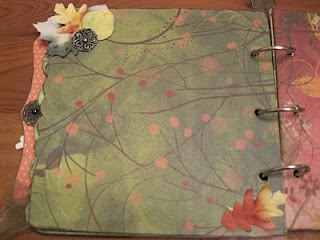


Supplies used: (Z1224) My Creations All Sorts Mini Album, (Z1269) Filigree Charms, (Z1333) Mocha Opaques, (X7128B) Olivia Level 2 paper pack, (D1371) Many Thanks stamp set, (Z2104) Barn Red stamp pad, (Z2191) Sunset stamp pad, (Z2155) Topiary stamp pad, (Z2111) Chocolate stamp pad, (Z2114) Cocoa stamp pad, (Z2303) Bamboo marker, (Z1048) Dimensional Elements Simple Alphabet (Lowercase), (Z1047) Dimensional Elements Simple Alphabet (Uppercase), (Z280) Natural Hemp, (Z679) Liquid glassPin It
I used one of my favorite new paper packs, Olivia, and the All Sorts Mini Album, to make a little fall themed scrapbook. The pictures will be added later but most pages will easily fit a vertically oriented 4" x 6" photo. I can crop horizontally oriented ones or just print them in a smaller size. I used a lot of our new Mocha Opaques (look at the middles of the little paper flowers, the Filigree Charms, and the edges of some of the scalloped pages). I used a tape runner to hold the paper to the album but added Liquid Glass in a lot of places such as some of the edges and to hold the Filigree Charms in place. I colored the Dimensional Elements which spell out "Fall" on the front cover with a Bamboo marker and then sponged Sunset and Chocolate ink onto it. Most of the edges of the papers were distressed with Chocolate ink.
I really tried to use up some of my embellishments (which is difficult for my hoarding sensibilities!). I even used up some of my Just Blooms Leaves which were retired awhile back but I've been holding onto for some special occasion! I will be ordering some of the new mini medley packs and will probably add more items (perhaps some plain cardstock pages or Flip Flaps) and even some rub ons later on, maybe after adding my pictures, but I wanted to post this now so you could see the pretty Olivia paper.


Supplies used: (Z1224) My Creations All Sorts Mini Album, (Z1269) Filigree Charms, (Z1333) Mocha Opaques, (X7128B) Olivia Level 2 paper pack, (D1371) Many Thanks stamp set, (Z2104) Barn Red stamp pad, (Z2191) Sunset stamp pad, (Z2155) Topiary stamp pad, (Z2111) Chocolate stamp pad, (Z2114) Cocoa stamp pad, (Z2303) Bamboo marker, (Z1048) Dimensional Elements Simple Alphabet (Lowercase), (Z1047) Dimensional Elements Simple Alphabet (Uppercase), (Z280) Natural Hemp, (Z679) Liquid glassPin It
Subscribe to:
Posts (Atom)




 Posts
Posts

